search
Veiksmīgu iepirkšanos!              
Darba laiks- darba dienās 10- 18.00

Neskaidrību vai jautājumu gadījumā Skype raksti mums vai zvani: 67845180; 26535359

Sony interactive entertainment PS5 Slim Cover (Chroma Pearl)

Sony interactive entertainment PS5 Slim Cover (Chroma Pearl)

Šai precei līzings nav pieejams.


Piegādes izmaksas:
Mūsu birojābez maksas
Rīgā5.69 EUR
Rīgas rajonā9.96 EUR
Rajonu centros9.96 EUR
Pārējā Latvijā9.96 EUR
Uz Omniva3.56 EUR

46.95


Cena uz 2026-06-04
Noliktavā: 1
Pēdējo reizi produkta informācija atjaunota:
2026-06-04 03:11
Add Products

Apraksts

These covers are compatible with PS5 Slim consoles with a disc drive only

Made by PlayStation: The only console covers made by PlayStation for PS5 that are designed to deliver the quality level you know and trust.

Easy to Use: Just remove your white PlayStation 5 console covers and click your new covers into place.

How to remove and replace the PS5™ console cover

how-to-change-covers-step-one

The top PS5 console cover has a PlayStation Logo.

Step 1

Turn off your PS5 console. Remove all cables and devices from your PS5 console. Wait a while for your PS5 console to cool down.

Step 2

Place your PS5 console on a flat surface with a protective covering and remove the base.

Step 3

Position your PS5 console so that the PS logo is facing up and the power button is facing away from you.

Step 4

Grip the bottom left corner of the cover and remove it by slightly pulling up and to your right. The cover lifts away.
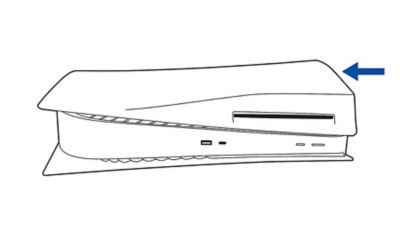
how-to-change-covers-step-two

Step 5

Attach the new top cover by sliding it on from right to left. You'll hear a click when the cover is secured.

Step 6

Connect the AC power cord, cables and base, and then turn on the power. Or, to attach a new bottom cover, follow the steps below.

 the steps below.

how-to-change-covers-step-three

The bottom PS5 console cover doesn't have a PlayStation Logo.

Step 1

Turn off your PS5 console. Then remove all cables and devices from your PS5 console. Wait a while for your PS5 console to cool down.

Step 2

Place your PS5 console on a flat surface with a protective covering and remove the base.

Step 3

Position your PS5 console so that the PS logo is facing down and the power button is facing towards you.

Step 4

Grip the top left corner of the cover and remove it by slightly pulling up and to your right. The cover lifts away.how-to-change-covers-step-four

Step 5

Attach the new bottom cover by sliding it on from right to left. You'll hear a click when the cover is secured.

Step 6

Connect the AC power cord, cables and base, and then turn on the power.


© Visas tiesības paturētas! Zauers Latvia SIA
Informācija pārpublicēšanā obligāti jābūt atsaucei uz Zauers.lv. Visas cenas norādītas bez piegādes. Piegādes maksas precēm tiek noteikta pēc piegādes vietas. Saņemot preci Zauers.lv birojā par piegādi nav jāmaksā. Preču piedāvājums un cenas var tikt mainītas bez iepriekšēja brīdinājuma. Zauers.lv preču apraksti tiek veidotie pēc ražotāju un ražotāju pārstāvju/noliktavu sniegtās informācijas. Preču pieejamība tiek saskaņota ar veikala noliktavas atlikumu un piegādātāju noliktavas atlikumiem reizi dienā automātiski, ja automātiska saskaņošana nav iespējama, tad tas tiek darīts manuāli ejot cauri preču grupām prioritārā secībā. Katras preces precīzu pieejamību Jūs, jebkurā Zauers.lv darba laikā, varat noskaidrot sazinoties ar mūsu konsultantiem.


  • www.zauers.lv
  • Brīvības iela 55 (ieeja no Ģertrūdes ielas)
  • Tālr.: 67845180
  • Mob. tālr.: 26535359
  • e-pasts: [email protected]

Pirkumu grozs(pirkt/labot)

Shopping cart

Uzticams partneris kopš 1998. gada.

Remonts un datu atjaunošana

Profesionālas tenisa bumbas

APPLE produktu dienas


Salidzini.lv logotips